
ALZip8.0 - Download
You'll be able to download in few seconds.
Publisher Description
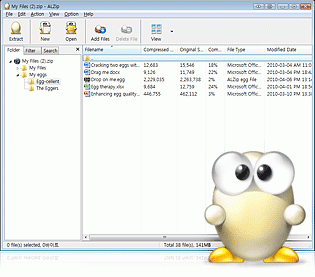
ALZip is a one-stop archiving and compression program designed for speed and ease of use. With support for more compression and archiving formats than any other major utility, ALZip is the only ZIP utility you'll ever need. The ALZip 8.0 provides its own file format "EGG," which makes better compression ratio and full Unicode support. Also, ALZip converts a broken language file into its original language. Users can open 40 archives and compression file formats, open CD image files (ISO, BIN), open virtual CD files (LCD), create 8 archives and compression file formats. ALZip provides other great functions: create self-extracting files (EXE), split files for easy transfers, file encryption with AES-256, integrate anti-virus software, automate tasks with ALZip command-line functions, and more. The ALTools family of free PC utilities shares the same cute Egghead characters, which are a fun addition to any computer, ideal for children, and powerful enough for IT pros.
Requirements:
- CPU 150 MHz +
- RAM 32 MB +
About ALZip
This File Compression program is available in English. It was last updated on 29 September, 2026. ALZip is compatible with the following operating systems: Windows.
The company that develops ALZip is ESTsoft Corp.. The latest version released by its developer is 8.0.
The download we have available for ALZip has a file size of 9.4 MB. Just click the green Download button above to start the downloading process. The program is listed on our website since 2010-06-23 and was downloaded 0 times. We have already checked if the download link is safe, however for your own protection we recommend that you scan the downloaded software with your antivirus. Your antivirus may detect the ALZip as malware if the download link is broken.
How to install ALZip on your Windows device:
- Click on the Download button on our website. This will start the download from the website of the developer.
- Once the ALZip is downloaded click on it to start the setup process (assuming you are on a desktop computer).
- When the installation is finished you should be able to see and run the program.
Program Details
System requirements
Download information
Pricing
Version History
version 8.0
posted on 2010-06-23
- New compression format EGG
- Unicode Support
- Better compression ratio through solid compression
- Support for more than 40 different file formats
- New interface and task results window
- Enhanced file encryption with AES-256
version 6.7
posted on 2007-01-24
New Windows Vista icons, improved command line, other improvements and fixes
Disclaimer
External Download
We do not host ALZip on our servers. We did not scan it for viruses, adware, spyware or other type of malware. This app is hosted by the software publisher and passed their terms and conditions to be listed there. We recommend caution when installing it.
The external download link for ALZip is provided to you by apps112.com without any warranties, representations or guarantees of any kind, so access it at your own risk.
If you have questions regarding this particular app contact the publisher directly. For questions about the functionalities of apps112.com contact us.
